
Shared vs VPS vs Dedicated Hosting: Which One Should You Choose?

Selecting the right web hosting infrastructure is one of the most critical decisions for your business’s digital presence. The foundation you choose directly impacts your website speed optimization, server performance, website security, and your long-term ability to scale.
But with terms like cloud hosting, virtualization, and bare-metal servers being thrown around, making an informed choice can feel overwhelming.
To help you decide, think of web hosting as choosing a physical space to live. Do you want a budget-friendly room in a shared apartment, your own partitioned townhouse, or a private standalone estate?
Choose Shared Hosting if you are a beginner, running a low-traffic site on a tight budget. Select VPS Hosting for rapidly growing websites that require dedicated power, advanced caching, and scaling flexibility. Upgrade to Dedicated Hosting for enterprise-level security, absolute server control, and massive daily traffic volumes.
The Three Core Types of Web Hosting Explained
1. Shared Hosting: The Apartment Complex
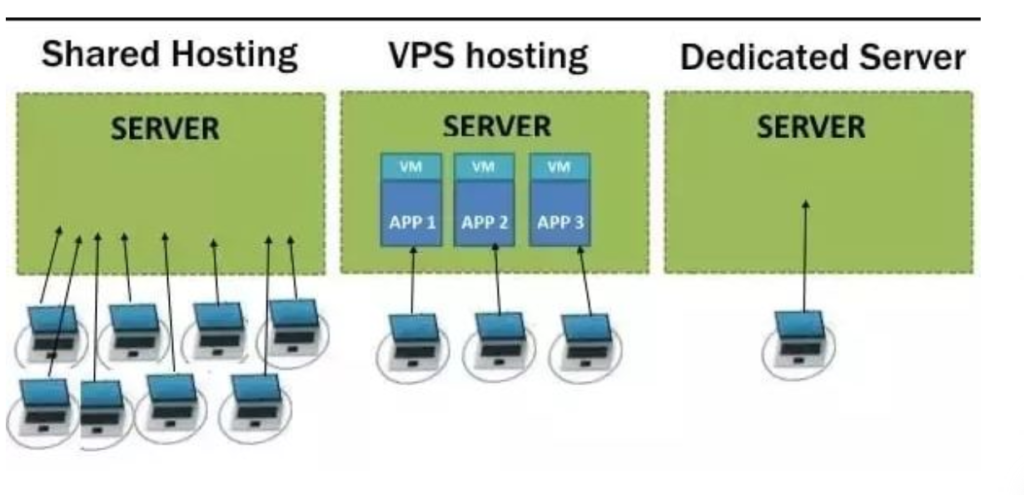
Shared hosting puts your website on a single physical server alongside dozens or hundreds of other websites. All sites draw from the exact same pool of resources, including CPU, RAM, and storage.
- How it works: Think of it like renting a room in a large apartment complex. You split the utility costs with neighbors, but you also share the common areas and resources.
- Pros: Highly affordable (typically $1 to $20/month), zero server maintenance required, and incredibly beginner-friendly.
- Cons: The “noisy neighbor” effect. If another website on your server experiences a massive traffic spike, your site’s uptime and server performance could degrade, leading to slow page loads.
- Best for: Personal blogs, portfolios, early-stage startups, and small local businesses with low traffic (under 3,000 daily visitors).
2. VPS (Virtual Private Server) Hosting: The Townhouse
VPS hosting utilizes virtualization technology (a hypervisor) to carve a physical server into isolated, discrete virtual environments. While you still share the physical hardware, your specific partition has guaranteed, dedicated resources.
- How it works: Like living in a townhouse. You share the overall building structure, but you have your own private walls, dedicated utility allocations, and your own front door.
- Pros: Highly predictable performance, root access for deep server customization, scalable RAM/CPU allocations, and significantly better website security than shared hosting.
- Cons: Costs more than shared hosting (typically $20 to $100/month) and requires a baseline understanding of server management (unless you choose Managed VPS hosting).
- Best for: Rapidly growing blogs, regional eCommerce stores, SaaS applications, and mid-sized businesses averaging 10,000 to 20,000 daily visitors.
Read More Blog : How to Secure Your WordPress Site from Hackers
3. Dedicated Hosting: The Standalone Estate
Dedicated hosting means you rent an entire physical bare-metal server exclusively for your organization. No other websites or applications live on this hardware.
- How it works: This is the equivalent of owning a massive standalone estate. Everything within the perimeter belongs to you, and you have absolute freedom to customize it.
- Pros: Maximum processing power, elite hardware optimization, top-tier protection against data breaches, and a dedicated IP address to guarantee email deliverability.
- Cons: Highly expensive (ranging from $70 to $1,000+/month) and requires an advanced in-house IT team or an expensive managed services plan to monitor hardware.
- Best for: Enterprise-level platforms, massive eCommerce sites with over 20,000 daily visitors, healthcare portals requiring HIPAA compliance, and financial systems handling sensitive transactions.
Comprehensive Web Hosting Comparison Table
| Hosting Metric | Shared Hosting | VPS Hosting | Dedicated Hosting |
| Price Range | $1 – $20 / month | $20 – $100 / month | $70 – $1,000+ / month |
| Resource Allocation | Shared across all accounts | Partitioned via virtualization | 100% dedicated to one client |
| Traffic Capacity | Best under 3,000 visitors/day | Handles 10,000 – 20,000 visitors/day | Over 20,000+ visitors/day |
| Root/Admin Access | No | Yes (With unmanaged/semi-managed) | Full control over hardware & OS |
| IP Address Type | Shared IP | Dedicated IP | Multiple Dedicated IPs |
| Email Capabilities | Limited (Under 500 emails/hour) | High volume, excellent delivery | Unlimited bulk sending capacity |
How We Evaluate Web Hosting Infrastructure
When choosing between Shared, VPS, and Dedicated server options, we look at several operational benchmarks:
- Performance & Website Speed Optimization: We analyze how effectively the host integrates advanced caching layers (like Redis or Memcached), modern solid-state drives (NVMe SSDs), and Content Delivery Network (CDN) support to reduce Time to First Byte (TTFB).
- Uptime & Reliability: A baseline standard of 99.9% uptime is required. We evaluate hardware redundancy and data center failovers.
- Website Security Architecture: Evaluation includes the presence of free SSL certificates, network firewalls, isolation protocols to prevent cross-site contamination, and automated backup frequency.
- Scalability Pathways: How smoothly can a site migrate from a shared tier to a high-powered cloud hosting or VPS plan without experiencing prolonged downtime?
- Developer Features: We verify availability of staging environments, reliable version control (Git integration), custom port mapping, and DNSSEC configuration.
Read More Blog:Web Hosting and Server Management: The Complete Guide
Practical Hosting Tips & Common Mistakes to Avoid
The “Over-Provisioning” Trap
Many business owners purchase a massive Dedicated Server before their site even launches. This wastes hundreds of dollars a month on processing power that sits completely idle. Start with a robust shared or entry-level VPS plan, monitor your analytics, and upgrade dynamically.
Ignoring the Managed vs. Unmanaged Distinction
Unmanaged servers are cheaper, but they leave you fully responsible for OS updates, security patches, and server crashes. Unless you have a dedicated system administrator, always choose Managed VPS hosting or managed dedicated plans so the host handles the technical heavy lifting.
Implement a CDN from Day One
No matter which hosting tier you select, integrating a global CDN (like Cloudflare or Fastly) offloads static content requests from your origin server. This instantly improves your global page speed, protects against DDoS attacks, and keeps your hosting costs manageable.

Conclusion & Future Web Hosting Trends
Choosing between Shared, VPS, and Dedicated hosting ultimately comes down to balancing your current traffic volume, your technical expertise, and your operational budget. Shared hosting is an incredible incubator for new projects; VPS hosting acts as the ultimate launchpad for growing businesses; Dedicated hosting provides the secure, unyielding raw muscle required by global enterprise operations.
As we look toward future web technologies, the lines between traditional hosting brackets are blurring. The industry is rapidly shifting toward serverless architectures, AI-driven server resource allocation, and edge computing networks. For long-term viability, look for hosting providers that integrate cloud scalability with hyper-fast NVMe storage and robust green energy initiatives. Focus on building a stable foundation today that lets you scale seamlessly into tomorrow.
Frequently Asked Questions (FAQ)
What is the primary difference between a shared IP and a dedicated IP address?
A shared IP address is used by hundreds of websites on the same server, meaning your email deliverability can be negatively impacted if a neighboring site sends spam. A dedicated IP address belongs exclusively to your domain, ensuring clean email sender reputation and simplifying SSL/security certificate mapping.
Can I migrate my WordPress hosting plan from shared to VPS later?
Yes. Most modern web hosts offer seamless, one-click migration pathways. If you are running a heavy WordPress hosting configuration, moving to a VPS will significantly improve backend performance, dashboard speed, and database execution times.
How does hosting impact website speed optimization and Core Web Vitals?
Your server environment handles the initial processing of your site’s code. High-performance VPS and dedicated systems process server-side scripts (like PHP) and databases faster, directly lowering your Largest Contentful Paint (LCP) and improving overall user experience scores.




