Manual data entry, repetitive document sorting, and tedious copy-pasting between cloud apps drain thousands of productive hours from modern businesses. Traditional automation tools—such as basic software macros or rigid rule-based scripts—often break down the moment an input format changes or a process deviates from standard logic. Today, AI automation has shifted from basic chatbots and experimental copilots into fully autonomous agentic workflows that reason, make decisions, and execute multi-step operations.
Whether you are looking to streamline daily workloads or scale enterprise operations, understanding AI workflow automation is the key to unlocking radical productivity.
What Is AI Automation?
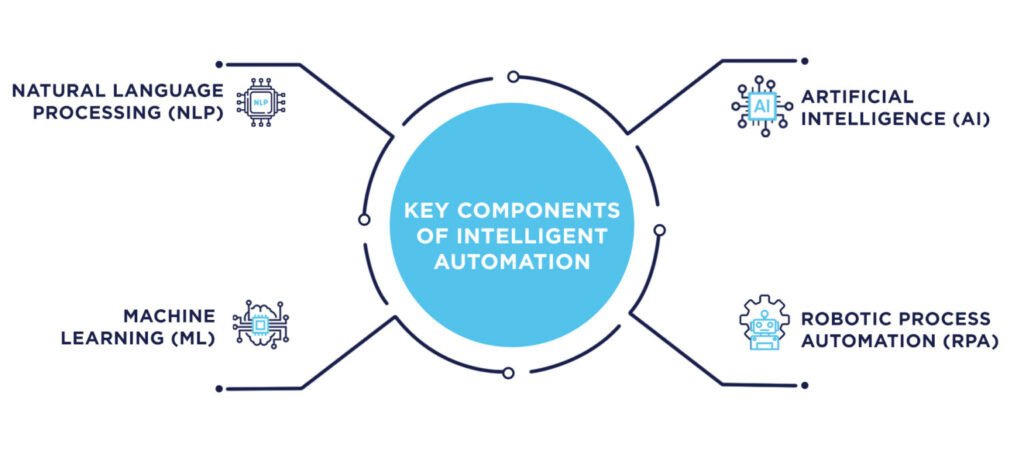
AI automation is the integration of machine learning models, natural language processing, and autonomous agents into business software to execute complex, repetitive tasks without constant human intervention. Unlike traditional software scripts that follow rigid “if/this/then” parameters, AI-powered automation can interpret unstructured text, process varied data formats, make qualitative decisions, and adapt dynamically to workflow exceptions.
Understanding the Shift to Intelligent Business Automation
Businesses can no longer rely solely on legacy scripting tools. Modern corporate environments handle massive volumes of unstructured data—customer support tickets, PDF contracts, messy emails, and market reports—that traditional rules-based systems cannot parse natively.
According to strategic tech metrics in The Ultimate Blueprint to AI Automation and SaaS Technologies, organizations leveraging AI business automation achieve up to a 5.8x return on investment within 14 months by replacing human bottlenecks with self-correcting pipelines.
Traditional Automation vs. AI Task Automation
- Traditional Automation: Strict, rule-dependent, prone to crashing on unexpected inputs, and restricted exclusively to structured data fields.
- AI Task Automation: Flexible, context-aware, capable of parsing messy data, and able to adjust actions based on semantic meaning and historical patterns.
Core Components Driving AI-Powered Automation
To build an efficient pipeline, you must understand the technical layers that make workflow automation with AI possible. These components work together to ingest data, process intent, and trigger actions across disparate SaaS environments.
1. Large Language Models and Natural Language Processing (NLP)
LLMs act as the cognitive center of your automation stack. They allow systems to read client feedback, summarize extensive documentation, or extract custom data points from messy invoices. When selecting your model stack, reviewing insights from Claude vs ChatGPT vs Gemini tool comparisons helps determine which underlying intelligence layer best handles your specific text-processing or logical routing needs.
2. Event-Driven Triggers and Middleware APIs
APIs bridge your cloud applications. An incoming trigger—such as a new customer inquiry submitted via a website form—activates an orchestration platform (like Zapier, Make, or custom Python microservices) to route data straight through an AI task automation evaluation layer.
3. Vector Databases and Memory Layers
For advanced operations, systems utilize vector databases to execute semantic searches and retrieve relevant corporate knowledge, ensuring that AI-driven responses remain precise and grounded in internal company guidelines.
Step-by-Step Guide to Implementing AI Automation
Deploying intelligent workflow automation does not require an enterprise engineering team if you follow a structured, phased implementation roadmap.
Step 1: Audit and Identify High-Friction Processes
Begin by mapping your organization’s recurring bottlenecks. Ideal candidates for AI business automation share these traits:
- High volume and repetitive execution cycles.
- Heavy reliance on handling text, emails, or documents.
- Frequent manual transfer of data between isolated SaaS applications.
Step 2: Establish Clean Data Pipelines
An automated system is only as reliable as the data it processes. Before connecting your models, clean up historical records, standardize file naming conventions, and unify data silos to prevent hallucinations or processing errors.
Step 3: Choose Your Orchestration Tool and AI Model
Select a no-code/low-code workflow builder or an API-first developer stack. Connect your chosen LLM endpoint to handle the text-parsing, classification, or decision-making logic required in the middle of your pipeline.
Step 4: Build, Prompt, and Test in a Sandbox Environment
Construct your pipeline step-by-step. Write clear, constraint-driven system prompts for your AI steps. Run test scenarios using edge cases—such as misspelled client inputs or unusually formatted attachments—to verify how the workflow reacts under stress.
Step 5: Implement Human-in-the-Loop (HITL) Oversight
Never cut humans out of critical loops entirely on day one. Set up notification channels (like Slack or Microsoft Teams alerts) where high-stakes decisions—such as outbound financial transactions or sensitive client emails—require a quick manual approval click before final execution.
Traditional Workflows vs. AI Automation Systems
| Feature | Traditional Automation | AI-Powered Automation |
| Logic Handling | Strict “If/Then” conditional statements | Contextual understanding, pattern matching, and reasoning |
| Data Type Support | Structured databases, clean CSVs, and explicit fields | Unstructured text, PDFs, emails, audio transcripts, and images |
| Error Management | Fails completely when encountering unexpected inputs | Dynamically interprets anomalies or flags them for review |
| Adaptability | Requires manual script rewrites when business logic shifts | Learns from historical corrections and adjusts over time |
Best Practices and Common Mistakes to Avoid
Even with advanced technology, poor execution can stall initiatives. Understanding common pitfalls keeps your deployment on track.
- Mistake: Automating a Broken Process. Speeding up an inefficient manual workflow only amplifies errors. Standardize and clean up a process before automating it.
- Mistake: Overholding Unmonitored Access. Allowing autonomous agents unbounded execution permissions without guardrails can lead to costly operational mistakes.
- Best Practice: Start Small and Scale Horizontally. Launch with a single low-risk workflow—such as automated email categorization or lead routing—before expanding intelligent automation across core enterprise functions. For infrastructure-level scaling, consult AI-driven infrastructure and server management guides to ensure your backend handles continuous workloads seamlessly.
- Best Practice: Maintain Rigorous Security Standards. Ensure any data processed by external AI endpoints complies with internal privacy policies and industry regulations (like GDPR or HIPAA). If your projects stall, review lessons from Why AI Automation Projects Fail: Common Mistakes and Proven Solutions to realign your strategy.
Related Articles
- The Ultimate Blueprint to AI Automation and SaaS Technologies
- Claude vs ChatGPT vs Gemini: Free AI Tool Comparison
- Why AI Automation Projects Fail: Common Mistakes and Proven Solutions
- How AI Is Transforming Web Hosting & Server Management
Conclusion
Embracing AI automation represents a vital shift from manual administration to scalable operational intelligence. By starting with a clear process audit, maintaining strict data hygiene, and integrating human oversight, beginners can transform rigid procedures into agile, self-optimizing pipelines. As artificial intelligence continues to advance, mastering these foundational workflows ensures your business remains competitive, efficient, and ready for future technological growth.
Frequently Asked Questions (FAQs)
What is the difference between standard automation and AI automation?
Standard automation uses rigid, hardcoded rules to move data between apps. AI automation incorporates machine learning and language models to interpret context, process unstructured data, and make qualitative decisions autonomously.
Do I need coding experience to build AI automation workflows?
No. Modern low-code and no-code orchestration tools (like Zapier, Make, and Retool) allow beginners to connect SaaS apps and trigger AI models using visual drag-and-drop interfaces.
What are the best use cases for AI business automation?
Top use cases include customer support ticket classification, invoice data extraction, automated lead scoring, personalized email drafting, and internal knowledge base search indexing.
How do I prevent AI models from making mistakes in my automation tasks?
Always implement a Human-in-the-Loop (HITL) verification step for sensitive actions, use tightly constrained system prompts, and reference Why AI Automation Projects Fail to avoid common data hygiene pitfalls.
How much does it typically cost to set up AI-powered automation?
Costs vary based on volume. Most no-code platforms feature tiered monthly pricing ranging from $20 to several hundred dollars, supplemented by API consumption fees for LLM calls (often fractions of a cent per prompt).