As artificial intelligence shifts from passive chatbots to autonomous digital workers, learning how to build an AI agent has become an essential capability for modern developers and business leaders alike. Unlike basic scripts or static programs, autonomous agents can reason, plan multi-step workflows, call APIs, and solve complex problems independently.
Whether you are looking to streamline operations or develop cutting-edge SaaS products, mastering AI agent development allows you to move beyond rigid workflows into true AI agent automation.
What is an AI Agent and How Do You Build One?
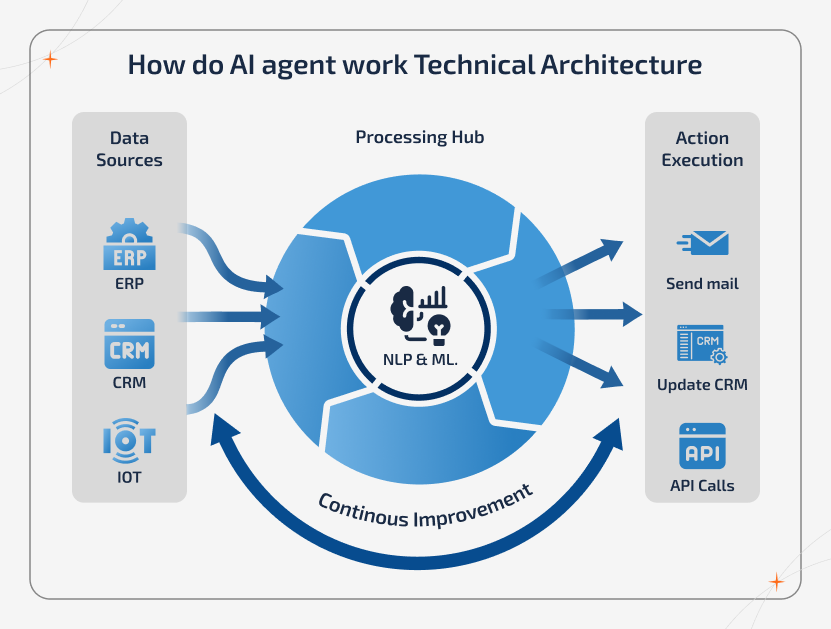
An AI agent is an autonomous software entity powered by a large language model (LLM) that can perceive its environment, formulate a plan, use tools (like APIs and databases), and execute tasks to achieve a specific goal. To create an AI agent, you typically define its core objective, select an LLM foundation, equip it with specialized tools, establish memory systems, and deploy a loop of reasoning and execution (such as the ReAct framework).
Understanding the Anatomy of an AI Agent
Before writing code or configuring platforms, you must understand the foundational components that separate standard chatbots from fully autonomous agents.
1. The Reasoning Engine (The Brain)
At the core of every agent is an LLM that processes natural language, evaluates inputs, breaks down complex goals into sub-tasks, and decides the next best action.
2. Memory Systems
Agents require both short-term memory (to track the current conversation or execution thread) and long-term memory (vector databases storing historical data or past interactions) to maintain context over extended periods.
3. Tools and Environment Integration
An agent without tools is just a chatbot. To deliver real business value, your agent needs access to external capabilities—such as web search, SQL database querying, or third-party SaaS APIs. For deeper insights into software architecture, check out this ultimate blueprint for AI automation and SaaS technologies.
Step-by-Step Guide: How to Build an AI Agent
Building your first autonomous workflow requires a structured approach. Follow this step-by-step roadmap to design, test, and deploy your system successfully.
Step 1: Define the Use Case and Objective
Avoid building a generic “do-everything” agent. Start with a hyper-specific use case, such as triaging inbound support tickets or qualifying sales leads.
Step 2: Choose Your Development Framework
Depending on your technical expertise, you can choose between low-code builders or code-first orchestration libraries:
- Code-First Frameworks: LangChain, LlamaIndex, or AutoGen for granular control over agent logic and loops.
- Low-Code Platforms: Ideal for teams leveraging low-code vs. no-code automation platforms to orchestrate agents visually.
Step 3: Equip Your Agent with Tools
Define the functions your agent can call. For example, if you want to build an AI agent that manages calendar scheduling, you must connect it to Google Calendar or Outlook APIs with strict parameter validation.
Step 4: Implement the Reasoning Loop (ReAct)
Configure the agent to follow a Reason-Act-Observe cycle. The agent thinks about what to do, takes an action using a tool, observes the output, and loops until the goal is achieved.
Step 5: Test and Optimize Guardrails
Run stress tests with edge cases to prevent hallucinations, infinite loops, or unauthorized data access. For more details on avoiding common pitfalls, review these common reasons why AI automation projects fail.
Core Comparison: Frameworks vs Platform Approaches
| Feature | Code-First Frameworks (e.g., LangChain) | Visual Low-Code Builders |
| Target Audience | Software engineers and data scientists | Business operators and citizen developers |
| Customization | Infinite control over prompts, memory, and logic | Pre-built templates with modular blocks |
| Development Speed | Slower (requires custom Python/TypeScript code) | Rapid prototyping and deployment |
| Integration Flexibility | Custom API connections to any data source | Limited to pre-integrated SaaS ecosystem connectors |
Real-World Use Cases for AI Agent Automation
Implementing AI agent automation can revolutionize multiple departments across your organization:
- Customer Success: Agents that autonomously read customer emails, check order statuses in Shopify, issue refunds within company policy, and draft human-like follow-up messages.
- Sales and Lead Generation: Autonomous researchers that crawl company websites, score leads against ideal customer profiles, and draft personalized outreach emails.
- Internal Operations: Systems that sync project statuses across distributed teams using modern cloud collaboration tools.
Best Practices for AI Agent Development
- Start Small: Begin with a single-purpose agent before attempting complex multi-agent collaborative networks.
- Enforce Human-in-the-Loop (HITL): Require human approval for high-stakes actions like sending public emails or executing financial transactions.
- Monitor Token Usage: Track your LLM API consumption closely to prevent unexpected cloud computing costs.
Common Mistakes to Avoid
- Neglecting Error Handling: Failing to account for API timeouts or malformed JSON outputs from the LLM, which can cause the agent to crash.
- Overcomplicating Prompts: Giving the agent too many conflicting system instructions at once, leading to degraded reasoning performance.
- Ignoring Data Security: Allowing agents unrestricted access to sensitive customer databases without proper role-based access control (RBAC).
Related Articles
- Why AI Automation Projects Fail & How to Ensure Success
- The Ultimate Blueprint to AI Automation & SaaS Technologies in 2026
- Low-Code vs No-Code Platforms: Which is Better for Automation?
- Cloud Collaboration Tools Explained: A Business Guide for 2026
Conclusion
Learning how to build an AI agent opens the door to unprecedented levels of operational efficiency and innovation. By understanding core architectural components, leveraging robust frameworks, and following strict security best practices, you can successfully implement AI agent automation across your workflows. Start small, iterate on your agent’s reasoning loops, and position your organization at the forefront of intelligent technology trends throughout 2026 and beyond.
Frequently Asked Questions
What is the best programming language for AI agent development?
Python is the undisputed industry standard for building AI agents due to its rich ecosystem of libraries like LangChain, LlamaIndex, OpenAI SDKs, and data science utilities. JavaScript/TypeScript is also popular for web-native agent applications.
Do I need coding experience to create an AI agent?
No. While custom code offers maximum flexibility, modern low-code platforms allow non-technical business users to build functional AI agents using drag-and-drop visual interfaces and natural language prompts.
How do AI agents remember past conversations?
AI agents use a combination of short-term memory (maintaining the immediate chat history buffer) and long-term memory (vector databases storing embeddings of past documents, interactions, and retrieved facts).
What is the difference between a chatbot and an AI agent?
A chatbot responds reactively to user inputs based on immediate context. An AI agent is goal-driven; it can proactively break down complex objectives, plan steps, utilize external tools, and execute workflows autonomously.
How much does it cost to run an AI agent in production?
Costs vary based on token consumption, the complexity of the underlying LLM (e.g., GPT-4o vs. smaller open-source models), and frequency of execution. Proper prompt caching and smaller task-specific models help minimize operational expenses.