









DNS (Domain Name System) acts as the phonebook of the internet. It translates human-readable domain names (like yourdomain.com) into machine-readable IP addresses or mail server locations. Managing a domain successfully relies primarily on three foundational DNS records: A records (mapping a domain to an IPv4 address), CNAME records (aliasing one domain to another), and MX records (routing email traffic). Mastering these three records covers over 90% of standard web hosting configurations.
Introduction to DNS and Web Hosting Infrastructure
Every time a user types a URL into a browser, an intricate background process fires up to connect that human-readable address to an exact location on a web server. This system is known as the Domain Name System (DNS). For webmasters, developers, and businesses investing in cloud hosting or high-performance VPS hosting, efficient DNS management is the invisible backbone that guarantees maximum website speed optimization, global scalability, and continuous uptime.
Misconfigured DNS records are among the leading causes of avoidable website downtime, broken email routing, and failed CDN (Content Delivery Network) caching. By understanding how to manage your core DNS zone files, you gain direct control over your digital infrastructure, allowing you to optimize server performance, secure domain communication, and establish a seamless user experience.
1. A Records (Address Records)
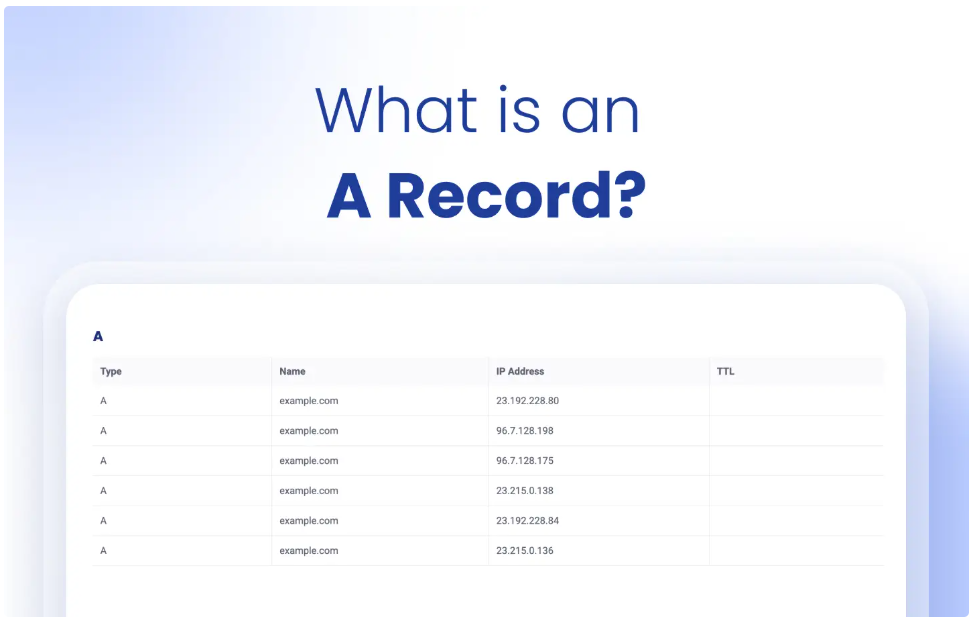
What is an A Record?
An A record (Address record) is the most fundamental type of DNS entry. It maps a human-readable domain name directly to a static IPv4 address, which represents the physical or virtual server hosting your website’s files.
Core Function
What an A Record does: An A record functions like a physical street address for a server. When a browser queries your domain, the A record provides the exact numeric destination (IP address) of the web hosting server where the site data lives.
Real-World Example & Syntax
- Host/Name: @ (Represents the root or apex domain, e.g., yourdomain.com)
- Value/Destination: 192.0.2.1
- Purpose: Points the core domain directly to a dedicated server or WordPress hosting account.
Expert Performance & Security Insights
For optimal server performance and redundancy, administrators often create two distinct A records: one for the apex domain (@) and one for the www subdomain, pointing both to the same IP address. When deploying high-traffic applications, pointing an A record to a load balancer rather than a single origin server dramatically improves application scalability and uptime.
2. CNAME Records (Canonical Name Records)
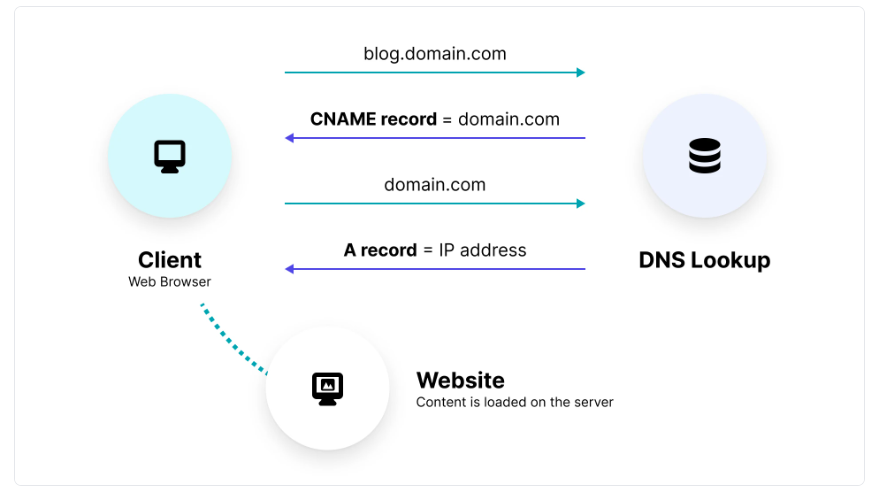
What is a CNAME Record?
A CNAME record (Canonical Name record) creates an alias that points one domain or subdomain to another domain name, rather than pointing directly to an IP address.
Core Function
What a CNAME Record does: A CNAME record maps a subdomain alias to a master “canonical” domain name. It tells the querying browser to look up the target domain’s DNS records to find the destination IP address, ensuring automatic updates if the primary infrastructure changes.
Real-World Example & Syntax
- Host/Name: blog
- Value/Destination: hosting-provider.com or mystore.shopify.com
- Purpose: Routes blog.yourdomain.com to an external host seamlessly.
Crucial Limitations & Caching Workarounds
- The Apex Restriction: By official DNS protocol standards, a CNAME record cannot be placed on the root or apex domain (@). Attempting to do so breaks other critical records, such as your email routing (MX records).
- Third-Party Services: CNAMEs are highly effective when integrating managed platforms or e-commerce systems. If the platform alters its underlying server IP addresses, your connection remains uninterrupted because your CNAME simply follows their root domain configuration.
- CDN Optimization: CNAME records are heavily utilized in CDN routing to map custom subdomains to edge-caching networks, significantly boosting global website speed optimization.
3. MX Records (Mail Exchange Records)
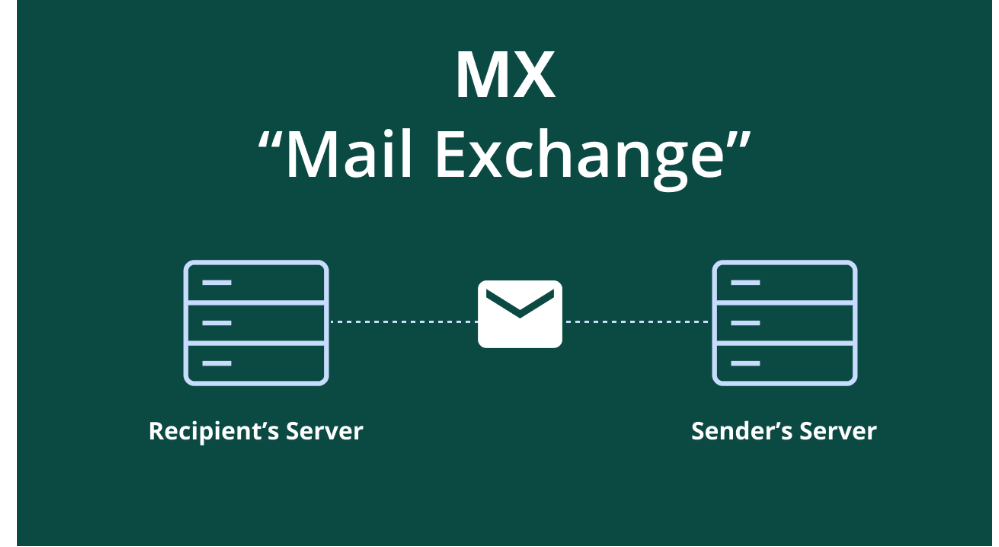
What is an MX Record?
An MX record (Mail Exchange record) determines which mail servers are responsible for accepting incoming email messages on behalf of your domain name.
Core Function
What an MX Record does: An MX record acts as the digital postal sorting center for a domain. When an email is sent to an address associated with your domain, the MX record routes that data packet to the designated email hosting infrastructure.
Real-World Example & Syntax
| Host / Name | Target / Destination Server | Priority |
| @ (Apex) | aspmx.l.google.com (Primary) | 10 |
| @ (Apex) | alt1.aspmx.l.google.com (Backup) | 20 |
The Role of Priority Numbers
MX records require a Priority value. Lower numbers represent higher priority. If the server with a priority of 10 goes offline due to temporary system issues, sending mail servers automatically route the traffic to the backup server configured at priority 20, maintaining high communications availability.
Critical Validation Rule: MX records must always point to a valid domain name that resolves via an A (or AAAA) record. They cannot point directly to an IP address, nor should they point to a CNAME alias.
Read More: Web Hosting and Server Management: The Complete Guide
Complete DNS Record Quick Reference Table
| Record Type | Maps From (Source) | Maps To (Target) | Primary Use Case | Key Constraint |
| A Record | Domain / Subdomain | IPv4 Address (192.0.2.1) | Pointing root domain to web hosting servers. | Must use a valid numeric IPv4 address. |
| CNAME | Subdomain Alias | Another Domain Name | Mapping subdomains to external services or CDNs. | Cannot be used at the root/apex (@) level. |
| MX Record | Domain / Subdomain | Mail Server Domain Name | Routing incoming domain email to inbox providers. | Must point to a domain with an A/AAAA record; utilizes priorities. |
How We Evaluate DNS & Hosting Infrastructure
To ensure maximum domain health, high-speed delivery, and enterprise-grade resilience, we analyze and grade DNS managers and hosting architectures across six core technical criteria:
- Performance & Query Latency: The speed at which global Anycast DNS networks resolve records across edge locations to ensure minimized Time-to-First-Byte (TTFB).
- Uptime & Redundancy: The infrastructural design of the nameservers, checking for automated failovers and protection against distributed outages.
- Security Ecosystem: Native integration of Advanced website security mechanisms, such as DNSSEC (DNS Security Extensions) to prevent cache poisoning, along with native DDoS protection.
- Scalability & API Access: The ease with which records can scale dynamically via APIs or cloud integrations to support evolving application footprints.
- Developer Features & TTL Control: Granular control over technical parameters, allowing ultra-low Time-To-Live (TTL) values for rapid records propagation.
- Ease of Use: Clear UI feedback to prevent human errors, such as alert warnings when a user attempts to break apex protocol rules.
Practical Hosting Tips & Common Mistakes to Avoid
- The Single SPF Record Trap: While you can have dozens of TXT records for verification, you must only have one unified SPF record for email validation. Creating multiple SPF records causes receiving mail servers to invalidate both, destroying your email deliverability.
- Lower Your TTL Pre-Migration: The Time To Live (TTL) value defines how long an external DNS resolver caches your record in seconds. If you are migrating to a new web server, lower your TTL to 300 (5 minutes) at least 24 hours before the move. This prevents visitors from hitting your old server due to lingering local caching.
- Clear Stubborn Local Caches: If your updates are live but you aren’t seeing them, flush your computer’s operating system resolver cache.
- Windows: Open Command Prompt and type ipconfig /flushdns.
- macOS: Open Terminal and type sudo dscacheutil -flushcache; sudo killall -HUP mDNSResponder.

Conclusion: Future Hosting Trends & DNS Evolution
Properly mastering DNS management is an indispensable technical skill. Correctly aligning your A, CNAME, and MX records forms the baseline for resilient, secure digital operations. Looking forward, the landscape of web architecture continues to shift toward serverless platforms, automated edge-routing architectures, and deeper integration of IPv6 records (AAAA).
As automated AI web crawlers and modern edge environments demand instantaneous responses, choosing optimized hosting providers that offer Anycast DNS architecture and proactive DNS security tools like DNSSEC is essential. By treating your DNS zone file as a dynamic optimization layout rather than a set-it-and-forget-it ledger, you guarantee your online infrastructure remains fast, accessible, and continuously online.
Frequently Asked Questions (FAQ)
What is DNS propagation, and why does it take time?
DNS propagation is the timeframe required for internet service providers (ISPs) and global routing nodes to update their local caches with your modified DNS settings. While many cloud providers update within 15 minutes, propagation can take up to 24–48 hours depending on your previous TTL settings.
Can I point my root domain to a CNAME record?
No, the official DNS specifications (RFC 1034/1035) state that a CNAME record cannot coexist with any other record types for the same name. Because the root domain (@) requires NS and SOA records, a CNAME cannot be placed there. For cloud services requiring this behavior, look for providers offering proprietary workarounds known as CNAME Flattening or ANAME records.
Why is my website loading on ‘www’ but showing an error on the non-www version?
This indicates that you have configured an A record or CNAME specifically for the www subdomain, but omitted an A record pointing the apex domain (@) to your web hosting server’s IP. Ensure both entries are accurately provisioned within your DNS zone dashboard.
How do DNS settings affect website speed and caching?
If your DNS provider utilizes a slow, localized Anycast network, lookup latency can add hundreds of milliseconds to your site load time. Additionally, syncing your records correctly with a premium CDN enables efficient edge caching, reducing backend server loads and enhancing total performance.